Appearance
Plan Embed
Visuary plans can be embedded in any web page using an <iframe>. The embed view shows the floorplan in read-only mode with controls to switch floors and view modes (2D, 3D, isometric), and a Visuary logo in the bottom-left corner.
URL Format
https://app.visuary.com/p/{planID}/embedOptional query parameters:
| Parameter | Values | Description |
|---|---|---|
variant | A–F | Load a specific renovation variant |
view | 2d, 3d, iso | Set the initial view mode |
Examples:
/p/mYstezLMn4Ld/embed
/p/mYstezLMn4Ld/embed?variant=B&view=3d
Finding the Plan ID
From the browser URL: When you have a plan open in Visuary, the plan ID is the segment after /p/ in the URL:
https://app.visuary.com/p/mYstezLMn4Ld
                          ^^^^^^^^^^^^
                            planID
Using the public API: The GET /plans endpoint returns all plans in your workspace. Each plan object contains an id field you can use directly.
Configuring Public Access
For an embedded plan to be accessible without a Visuary login, you must enable public access on the plan:
- Open the plan in Visuary
- Click the ⋮ (three-dot menu) in the top-right corner
- Open the Share section
- Under Everyone with the link, expand the permission dropdown and set it to at least Read plan
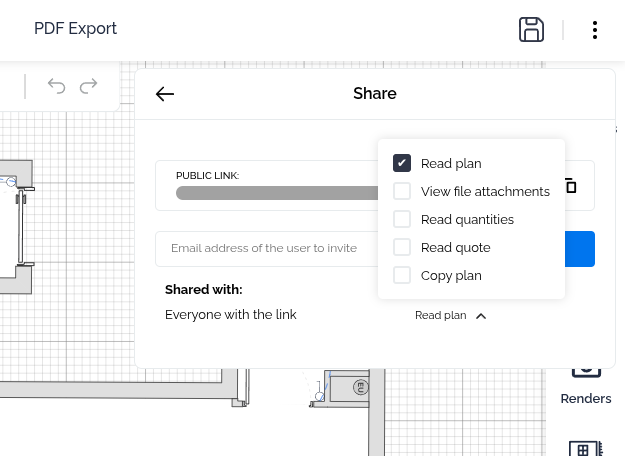
Once Read plan is enabled for "Everyone with the link", the embed URL is publicly accessible to anyone with the link.
Example
Copy the snippet below and replace YOUR_PLAN_ID with your plan's ID:
html
<iframe
	src="https://app.visuary.com/p/YOUR_PLAN_ID/embed"
	width="800"
	height="500"
	style="border: none;"
>
</iframe>